

Umrah Help & Support: Essential Services for Pilgrims
Help & Support: Navigating Your Journey Safely and Comfortably
Performing Umrah independently means you are responsible for managing any difficulties that arise – and difficulties do arise. This guide gives you the exact contact points, office locations, and practical steps you need to handle emergencies, health issues, mobility needs, lost belongings, consular matters, and connectivity problems in Makkah and Madinah, so that disruptions stay minor and your worship continues.
Who to contact and how
Situation | Who to Contact | How |
|---|---|---|
Medical emergency | Haram Emergency Services | Dial 911 (Saudi national emergency) |
Lost passport | Your country's consulate | Embassy hotline or in person — see consular section below |
Lost belongings in Haram | Haram Lost & Found Office | Gates 79 / 1 area — report to security post first |
Wheelchair / mobility aid | Haram Service Desk | On arrival at any major entry gate — no pre-booking required |
SIM card / app failure | Operator service counter | Airport, licensed mall kiosk, or operator branch near Haram |

FAQs
Look at the frequently asked questions on DIY Umrah, preparations and everything you need from our dedicated page.

Tips and Hacks
Discover how to navigate the challenges of your pilgrimage—from beating the crowds to savvy budgeting—by exploring our Umrah Travel Tips page.
Immediate Assistance: Emergency Numbers and Contact Points
In Saudi Arabia, the national emergency number is 911 and covers police, fire and ambulance. For medical emergencies inside the Haram precincts, dedicated Haram Emergency Services operate independently of the general 911 dispatch; flag down any security or service officer immediately and they will radio for a medical response team.
Pro Tip
Save all emergency numbers in your phone under a clearly labelled contact ‘UMRAH EMERGENCY’ before you board. Your roaming plan may prevent standard internet calls, but local numbers always work on a Saudi SIM.
Saudi national emergency
911

Haram Medical Emergency
Flag Haram security staff — faster than 911 inside the Haram precincts

Ministry of Hajj and Umrah pilgrim helpline
Nusuk App → Help
Multilingual support during Umrah season via in-app function

Ambulance
997
Health & Safety: Accessing Medical Clinics and Pharmacies
Medical facilities in the Grand Mosque precincts are well-resourced. The Haram Authority operates first-aid stations at regular intervals throughout both Masjid al-Haram and Masjid an-Nabawi; look for the green crescent symbol or ask any uniformed staff member to direct you.
Masjid al-Haram
- First-aid stations are positioned throughout the ground-floor corridors and at each expansion wing
- A fully equipped hospital (Al-Haram Emergency Hospital) operates within the Haram complex
- Wheelchair and stretcher teams patrol continuously during prayer times
Masjid an-Nabawi
- First-aid booths are located at each of the main numbered gates
- Al-Haram Hospital is located in Madinah near Masjid an-Nabawi.

Pharmacies (locally: saydaliyyah)
In Makkah: those in the Abraj Al-Bait area and along Ajyad Street operate 24 hours during peak season
In Madinah: those on King Faisal Road near the Haram gates offer round-the-clock service
Pro Tip
Common items to buy locally include oral rehydration salts, paracetamol, blister plasters, and throat lozenges – the dry Hijaz air affects most pilgrims within the first 48 hours.
Mobility Assistance: Booking Wheelchairs and Electric Carts
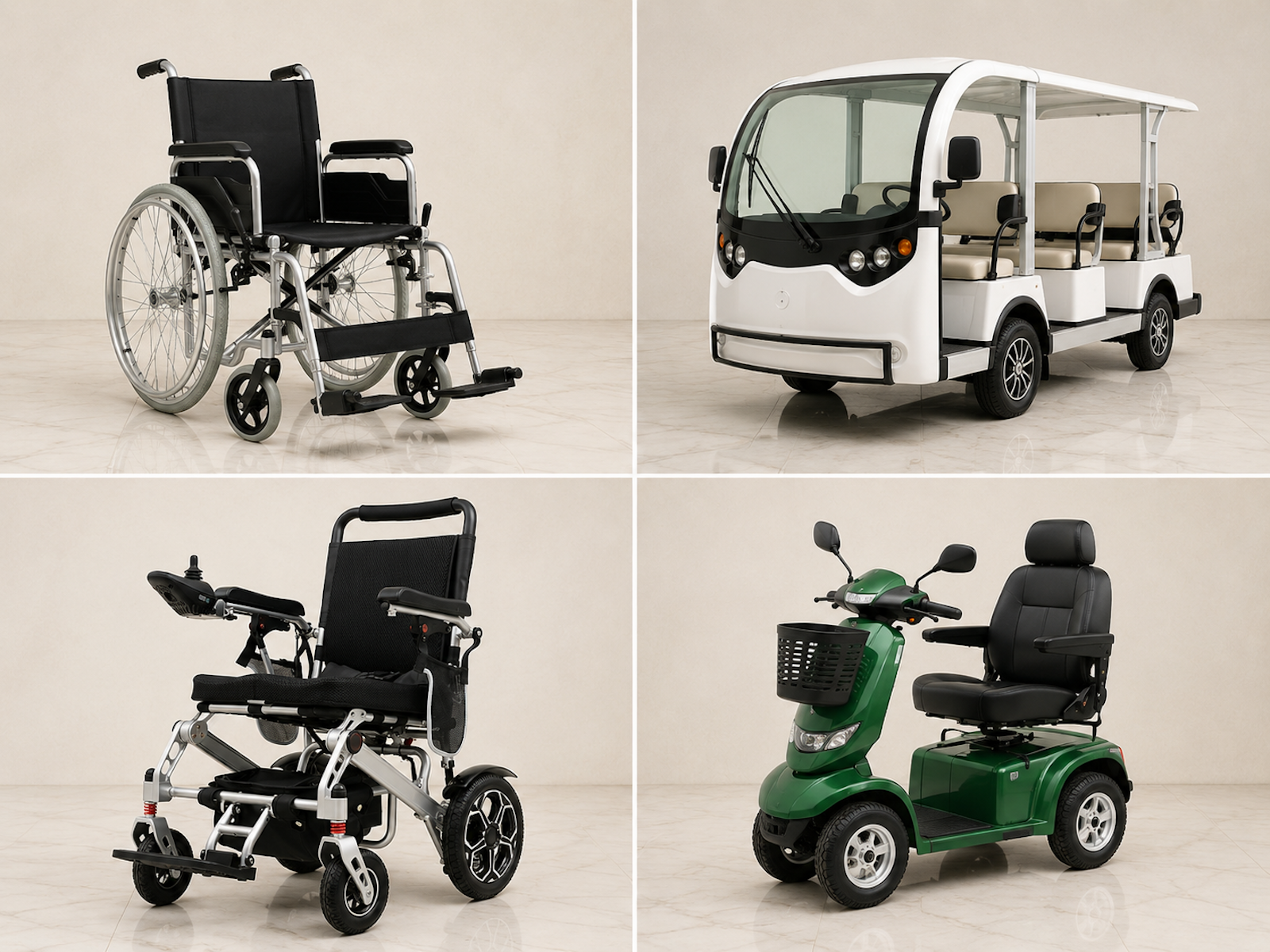
Manual wheelchairs are provided free of charge by the Haram Authority at all major entry gates on a first-come, first-served basis — no pre-booking required. Attendants are available for an agreed fee, negotiated on the spot in Saudi Riyals.
For Sa'i specifically, the Mas'a (the walkway between Safa and Marwa) has a dedicated accessible lane on the ground level, with attendants stationed throughout. Motorised wheelchairs are available for hire for the Sa'i corridor.
Motorised scooters and electric carts inside Masjid al-Haram are primarily managed by the Haram Authority's medical services — they are not available on-demand for individual pilgrims inside the mosque. Report to the accessibility desk at a main gate on arrival.
Carts available inside Masjid al-Haram
The Grand Mosque now offers several types of carts to help pilgrims with mobility needs:
Free manual carts
- eastern courtyard at Bab al-Salam (Gate 19)
- western courtyard at Al-Shabika Bridge (Gate 64)
Paid manual carts
- ground path (Gate 14)
- first-floor path (Gate 16)
- western courtyard (Al-Shabika Bridge, Gate 64)
- southern courtyard (near Toilet No. 2)
Electric golf carts
can be reserved directly at
* the western square (Al-Shabika Bridge, Gate 64)
* Ajyad Bridge (Gate 4)
* Ajyad Stairs (from the first floor, Gate 4)
Accessibility checklist before travel: |
|---|
✓ Aim for hotels under 5 minutes' walk to minimise ground-floor transit |
✓ Contact hotel in advance to confirm wheelchair-accessible route to Haram gate |
✓ Arrive at Haram accessibility desk early on first day to confirm Sa'i arrangements |
Lost and Found: Recovering Belongings or Rejoining Your Group
Items left behind in the Haram are collected by cleaning staff and taken to the official lost-and-found office. Recovery rates for wallets and phones are notably high given the spiritual environment; most pilgrims who report losses promptly do recover their items.
Lost & Found Offices
Masjid al-Haram
The official office is near Gate 79 and the Ajyad area.
Masjid an-Nabawi
The official office is in the southern courtyards, close to Gates 366 and 367.
If you... | What to do |
|---|---|
Lose your mobile phone |
|
Lose your wallet or cash |
|
Become separated from your group |
|
Consular and Government Support: Dealing with Passport Issues
A lost or stolen passport during Umrah requires prompt action. Saudi Arabia has a well-established consular infrastructure in both Makkah and Jeddah, with most countries maintaining a consulate-general in Jeddah that handles Umrah-related emergencies.
Immediate steps if your passport is lost or stolen:
- Report the loss to the nearest police station and obtain a police report – this is required for an emergency travel document
- Contact your country’s consulate or embassy in Jeddah; for UK pilgrims, the British Consulate General Jeddah handles passport emergencies
- If your visa is tied to the lost passport, notify the Saudi immigration authority (Jawazat) – the nearest Jawazat office can issue a temporary status confirmation
- Keep a photograph of your passport data page stored separately in cloud storage and in email – this significantly speeds up the emergency document process
Pro Tip
Before travelling, photograph your passport, Umrah visa, and travel insurance policy. Store these in a password-protected cloud folder and email them to a trusted contact at home. In a genuine emergency, having these on hand can reduce a multi-day process to a few hours.
Connectivity Support: SIM Card Issues and Essential App Help
Reliable connectivity is not a luxury during Umrah – your Nusuk App, hotel booking confirmations, and navigation all depend on it. Saudi SIM cards are available at King Abdulaziz International Airport (Jeddah), King Khalid International Airport (Riyadh), and Prince Mohammad bin Abdulaziz Airport (Madinah), as well as from operator branches and licensed kiosks throughout both city centres.
If your SIM card stops working:
- Visit the nearest operator service centre with your passport – SIM registration in Saudi Arabia is tied to passport data and replacements require in-person verification
- All three major Saudi operators have branches within walking distance of the Haram in Makkah
- In Madinah, operator branches can be found in the following locations near the Haram's north side: Al-Saha Commercial Market, Al Fath District, and Bada'ah District.
Nusuk App issues:
- If you cannot access your Nusuk account, use the in-app ‘Help’ or ‘Support’ function to raise a ticket – available under the profile menu
- Rawdah slot bookings are non-transferable and tied to your passport number; if you miss a slot due to a technical failure, contact Nusuk support immediately and document the error with a screenshot
- Ensure the app is updated before travel – outdated versions have caused login failures for some pilgrims
Nusuk App Troubleshooting Guide
For a full walkthrough of the Nusuk App, including registration and booking your permit, click here and see our Nusuk App Troubleshooting Guide
Cultural support: language barriers and local customs
Arabic is the primary language in the Haramain, but the environment is genuinely international. Haram staff are accustomed to communicating with pilgrims across dozens of languages; pointing, gesturing, and writing are all acceptable. English is widely understood in hotel lobbies, pharmacies, and tourist-facing offices.
Practical language tips:
- Learn five Arabic phrases: ‘Ayna dawrat al-miyah?’ (Where is the toilet?), ‘Ayna al-makhraj?’ (Where is the exit?), ‘Ittasil bi al-shurta’ (Call the police), ‘Ana marid’ (I am ill), ‘Ana ta'ih’ (I’m lost – literally ‘I’ve gone astray’) – these cover most emergencies
- Download an offline Arabic translation pack before travel – internet connectivity inside the Haram is variable during peak prayer times
- Translation apps work well for written Arabic; hold signage up to your camera if you are unsure of directions
Cultural customs to observe:
- Photography inside the Haram is a sensitive area – avoid pointing a camera at worshippers; focus on architecture if photographing
- Dress code enforcement is applied at Haram entry points – shoulders, knees, and in Ihram state, correct Ihram garments are checked
- Loud voices, arguments, and assertive physical contact are all contrary to Haram etiquette and may result in security involvement
Frequently Asked Questions
Who should I call if there is a medical emergency in the Haram?
Dial 911 for the Saudi national emergency line. Inside the Haram, flag down any security officer or service staff member immediately – they carry radios and will summon a Haram medical team faster than a general 911 dispatch can respond. First-aid stations are stationed throughout the main corridors; look for the green crescent symbol.
Where are the official lost and found offices located in Makkah?
Current official location of Masjid al-Haram lost-and-found office – historically near the King Fahd Gate / Gate 79 area but subject to change with expansion works. Report your loss to a Haram security post first and obtain a reference number, then proceed to the lost-and-found office with your passport for identification.
How can I book a motorised scooter for Sa’i?
Dedicated accessible lanes for Sa’i are available on the ground floor of the Mas’a for wheelchair users. Electric wheelchairs can be pre-booked online and delivered directly to your hotel in Makkah or Madinah. Each wheelchair covers approximately 20 km on a full charge — sufficient for Tawaf, Sa'i, and movement around the Haram throughout the day. Visit assist.haramain.com to book.
What should I do if I lose my mobile phone or wallet?
For a lost phone: report immediately to the nearest Haram security post, obtain a reference number, then contact your mobile network’s international helpline to suspend the SIM. If you used the phone for the Nusuk App, log in on a borrowed device – your account is tied to your passport number, not your handset.
For a lost wallet: freeze your cards via your bank’s international emergency line and contact your consulate if you need emergency funds or travel documentation assistance.
Is there a 24/7 helpline for international pilgrims?
Yes. The Ministry of Hajj and Umrah operates a 24/7 helpline for international pilgrims. From outside Saudi Arabia, call +966 920002814 for an immediate response. From inside the Kingdom, dial 1966. You can also reach the Ministry by email at care@haj.gov.sa, with responses within one business day.
Your pilgrimage in the safest hands online
The world's #1 halal-friendly booking platform. Officially aligned with Saudi authorities, airline and lifestyle rewards programmes.






Scan the QR code with your phone camera to download it.


Ready to Start Your Umrah Journey?
Browse Halalbooking’s curated selection of Makkah and Madinah properties, filtered by proximity to the Haram and refundable booking options, so that your base is settled before you land.